I have done a lot of pair programming interviews for my client. I enjoy doing them and I think they are extremely valuable.
Hiring is probably the most important thing to get right, and I think that pair programming interviews (or "auditions" as some like to call them) are usually the best way to interview developers.
Setting up a pair programming interview
For interviewing Java developers, I have a machine set up with a choice of IntelliJ IDEA and Eclipse with an empty workspace. I think it is important to try to make the candidate as comfortable as possible with the development environment so that it isn't a distraction. If you work with Apple Macs, also provide Windows (and maybe Linux) machines for candidates who aren't familiar with Macs because otherwise the difference in IDE shortcuts gets in the way and the idea of a pair programming interview isn't to see how familiar the candidate is with a particular OS.
I allow one hour for these interviews - I have found that is long enough to get a good idea about the suitability of a candidate.
Choosing a problem
One of the most surprising things is how small the problem has to be in order to be achievable in one hour. Developers (including myself) are often very optimistic about how quickly they can program a solution to a simple problem. I would urge you to try out the problem you want to use for a pair programming interview with a trusted colleague, before using it with a candidate, to find out whether it is realistic. To give you an idea of the size of problem you need, I used to use the problem described in this article.
I know of another team at my client who provide a small code base pre-prepared for the interview which includes a bug which the candidate has to find. I think this is a great idea. Choose a problem which is realistic for the sort of code that the candidate will be writing (or the sort of work they will be doing, e.g. debugging legacy code) in the job you are hiring for. There is no point testing for whether a candidate can write WeakHashMap from scratch if you are hiring for a typical enterprise IT project.
What pair programming interviews demonstrate
Pair programming interviews aren't a silver bullet for recruiting developers - they are good at determining some qualities of a candidate but not all. In particular I think they are more valuable in demonstrating programming style and personal interaction rather than problem solving. However, in typical enterprise IT projects, more problems are caused by over complex solutions to simple problems, or by solving the wrong problem, than having problems that are unique and difficult and require a brand new algorithm.
Sometimes it is good to use a problem which has some potential for ambiguities in the details of what is being asked for. This is a very good way to see whether a candidate asks for clarification or just makes assumptions which aren't justified. In enterprise IT systems, making assumptions about the desired behaviour of a system can cause a lot of rework and bugs so I look for candidates who demonstrate that they are thinking through possible ambiguities and who pro-actively ask for clarifications about the problem.
Being realistic
I make it very clear to candidates that I am looking for production quality, simple code rather than for them to show off all the language features they know. The problems that I choose are simple enough that I'm not interested in just getting a solution. I am looking for code that I would be happy working with. My boss, Pippa Newbold, has a very good rule of thumb. "At the very least, don't hire someone who will make the code base worse". It seems obvious and yet at other companies I have sometimes observed panic hiring just to make up the numbers where this rule would have saved lots of rework and bugs.
Giving something back
I try to teach the candidates something new in a pair programming interview where possible. Often this is something like an IDE shortcut but is occasionally a language feature or a "programming in the small" style discussion. I like candidates to get something back for giving up their time to come in for an interview, and a pair programming interview can be very daunting for candidates not used to pair programming.
Does it work?
As far as I can tell, all candidates that I have "passed" using a pair programming interview have turned out to be worth hiring.
However, that doesn't include those candidates that I've "passed" who didn't take the job and I don't know whether any of those candidates that I've "failed" would have been good either.
My suspicion is that it is a technique which is slightly more prone to "failing" good candidates than hiring poor candidates, but that really is just a gut feeling. If anyone knows any studies on pair programming interviews I'd be very interested to hear more.
Where it probably doesn't work
I guess that interviewing people for research or work which requires solving deep and difficult problems probably requires a different approach. Also, for hiring people with limited programming experience who you want to train up it might not be suitable.
Copyright © 2009 Ivan Moore
Saturday, October 31, 2009

Thursday, July 9, 2009
Cleaner code
I recommend the book "Clean Code" - I completely agree with its philosophy and have written a few articles of my own about "programming in the small".
Mike Hill and I presented a session on "programming in the small" at the "Software Craftsmanship" conference 2009 in London and at QCON London 2009 - and one of or examples was taken from "Clean Code".
Clean Code
One of the examples in "Clean Code" is some code for parsing command line arguments, written in Java by Bob Martin. It is shown as an example of code which has already been made clean. There is an article (separate from the book) by Bob Martin about the code we use for this example. The source code is available from github:
git clone git://github.com/unclebob/javaargs.git
Mike and I chose this code because we wanted to take code which was already quite clean and show how even good code can sometimes be cleaned up even more - we wanted to push the cleanliness as far as possible in the session.
Just looking at the "Args" class only, this method seemed the one most wanting some further work (sorry, formatting is ugly - reformatted to fit blog page width):
So - what could be better? What struck Mike and I was the duplication of "marshalers.put(elementId, new XXX());"
To remove this duplication, first extract a variable called argumentMarshaler of type ArgumentMarshaler in each of the branches, then move the expression "marshalers.put(elementId, argumentMarshaler);" outside of the if statement, and the declaration of the variable "argumentMarshaler" before the if statement. You end up with:
Now it's clearer that this method is doing too many things - one of those things being to find the relevant marshaler. We can extract a method for finding the marshaler and, having been extracted can improve it further by removing unnecessary structured programmingness, ending up with:
Notice that "elementId" is only used for the exception to throw if an appropriate ArgumentMarshaler cannot be found. Further investigation shows that actually this parameter isn't used in ArgsException for an "INVALID_ARGUMENT_FORMAT" and we can just delete this argument (and hence the "elementId" parameter of "findAppropriateArgumentMarshaler") with no change to the behaviour of the code!
There is more that can be done with the Args class - but that is beyond the scope of this article.
Conclusion
I hope this has shown that even clean code can be made cleaner - without having to do anything too clever or drastic. It's often easier to see such opportunities in other people's code or code you haven't seen for a while - even the best programmers can miss opportunities for making code simpler.
Copyright © 2009 Ivan Moore
Mike Hill and I presented a session on "programming in the small" at the "Software Craftsmanship" conference 2009 in London and at QCON London 2009 - and one of or examples was taken from "Clean Code".
Clean Code
One of the examples in "Clean Code" is some code for parsing command line arguments, written in Java by Bob Martin. It is shown as an example of code which has already been made clean. There is an article (separate from the book) by Bob Martin about the code we use for this example. The source code is available from github:
git clone git://github.com/unclebob/javaargs.git
Mike and I chose this code because we wanted to take code which was already quite clean and show how even good code can sometimes be cleaned up even more - we wanted to push the cleanliness as far as possible in the session.
Just looking at the "Args" class only, this method seemed the one most wanting some further work (sorry, formatting is ugly - reformatted to fit blog page width):
private void parseSchemaElement(String element)
                           throws ArgsException {
   char elementId = element.charAt(0);
   String elementTail = element.substring(1);
   validateSchemaElementId(elementId);
   if (elementTail.length() == 0)
       marshalers.put(elementId,
                      new BooleanArgumentMarshaler());
   else if (elementTail.equals("*"))
       marshalers.put(elementId,
                      new StringArgumentMarshaler());
   else if (elementTail.equals("#"))
       marshalers.put(elementId,
                      new IntegerArgumentMarshaler());
   else if (elementTail.equals("##"))
       marshalers.put(elementId,
                      new DoubleArgumentMarshaler());
   else if (elementTail.equals("[*]"))
       marshalers.put(elementId,
                      new StringArrayArgumentMarshaler());
   else
       throw new ArgsException(INVALID_ARGUMENT_FORMAT,
                               elementId, elementTail);
}
So - what could be better? What struck Mike and I was the duplication of "marshalers.put(elementId, new XXX());"
To remove this duplication, first extract a variable called argumentMarshaler of type ArgumentMarshaler in each of the branches, then move the expression "marshalers.put(elementId, argumentMarshaler);" outside of the if statement, and the declaration of the variable "argumentMarshaler" before the if statement. You end up with:
private void parseSchemaElement(String element)
                           throws ArgsException {
   char elementId = element.charAt(0);
   String elementTail = element.substring(1);
   validateSchemaElementId(elementId);
   ArgumentMarshaler argumentMarshaler;
   if (elementTail.length() == 0) {
       argumentMarshaler =
                  new BooleanArgumentMarshaler();
   } else if (elementTail.equals("*")) {
       argumentMarshaler =
                  new StringArgumentMarshaler();
   } else if (elementTail.equals("#")) {
       argumentMarshaler =
                  new IntegerArgumentMarshaler();
   } else if (elementTail.equals("##")) {
       argumentMarshaler =
                  new DoubleArgumentMarshaler();
   } else if (elementTail.equals("[*]")) {
       argumentMarshaler =
                  new StringArrayArgumentMarshaler();
   } else
       throw new ArgsException(INVALID_ARGUMENT_FORMAT,
                               elementId, elementTail);
   marshalers.put(elementId, argumentMarshaler);
}
Now it's clearer that this method is doing too many things - one of those things being to find the relevant marshaler. We can extract a method for finding the marshaler and, having been extracted can improve it further by removing unnecessary structured programmingness, ending up with:
private void parseSchemaElement(String element)
                         throws ArgsException {
   char elementId = element.charAt(0);
   String elementTail = element.substring(1);
   validateSchemaElementId(elementId);
   marshalers.put(elementId,
        findAppropriateArgumentMarshaler(elementId,
                                         elementTail));
}

private ArgumentMarshaler findAppropriateArgumentMarshaler(
                    char elementId, String elementTail)
                                   throws ArgsException {
   if (elementTail.length() == 0) {
       return new BooleanArgumentMarshaler();
   } else if (elementTail.equals("*")) {
       return new StringArgumentMarshaler();
   } else if (elementTail.equals("#")) {
       return new IntegerArgumentMarshaler();
   } else if (elementTail.equals("##")) {
       return new DoubleArgumentMarshaler();
   } else if (elementTail.equals("[*]")) {
       return new StringArrayArgumentMarshaler();
   } else
       throw new ArgsException(INVALID_ARGUMENT_FORMAT,
                               elementId, elementTail);
}
Notice that "elementId" is only used for the exception to throw if an appropriate ArgumentMarshaler cannot be found. Further investigation shows that actually this parameter isn't used in ArgsException for an "INVALID_ARGUMENT_FORMAT" and we can just delete this argument (and hence the "elementId" parameter of "findAppropriateArgumentMarshaler") with no change to the behaviour of the code!
There is more that can be done with the Args class - but that is beyond the scope of this article.
Conclusion
I hope this has shown that even clean code can be made cleaner - without having to do anything too clever or drastic. It's often easier to see such opportunities in other people's code or code you haven't seen for a while - even the best programmers can miss opportunities for making code simpler.
Copyright © 2009 Ivan Moore
Saturday, June 20, 2009
Project management lessons - commitment
Have you ever heard (or said) something like "you've got to work [long hours/weekends] because the customer has been promised [some system/feature] by [some date]"?
Commitments can be made but not assigned
People only feel committed to things they have committed to themselves. Telling someone that they have to work long hours/weekends because of a commitment someone else has made can lead to demotivation and resentment. Productivity is very likely to suffer (quality decreasing, more rework due to mistakes, more stupid things done due to rushing or tiredness). Seeing that the work isn't being completed quickly enough, bad managers think that it just requires even more hours to be put in (they try to impose "more commitment" and concentrate on the inputs rather than the outputs). This is the recipe for a "death march" project.
Estimates are not commitments
As a project manager, you have to understand the difference between an estimate and a quote. An estimate is not a commitment. As a project manager, if you make a commitment that something will be done by a certain date then do not rely on being able to just use estimates directly - you need to apply some project management techniques. One technique that I have found works well, as mentioned in my previous article is "extreme planning".
Commitment can work wonders
When someone really feels committed to something, then they will be motivated and focused. Software developers will often work harder and more effectively on their pet open source project than they do at work due to this motivation. This sort of commitment cannot be forced onto someone. There are lots of ways to ensure it doesn't happen (sadly common) and a few things you can do to provide an environment in which it might happen - and hence see massive improvements in productivity and quality as a result.
One factor is the level of technical autonomy. Many large companies have standards which are intended to reduce costs (for various reasons I won't go into). Unfortunately, I think in many cases these standards tend to reduce teams' technical autonomy, which reduces motivation, having a larger negative effect on productivity (hence cost) than the savings made by the standardization. I'm thinking of things like (for example) being told you have to use Wholly Pointless Server when some free open source app server would be a better choice.
Another factor which I think is very important is how directly developers work with their customers. A lot of developers (and certainly the ones I like working with) like to do things which are useful and appreciated by the users of their software. Sometimes the way teams are set up there is a separation between developers and customers - often a business analyst who understands the business and is more available than the real customer(s). This does have benefits when a developer wants a question answered straight away (but the customer isn't available), because otherwise the developer would be blocked or have to context switch onto another area of work. However, I think the best arrangement (not always possible) is when the real customer is available all the time and the developers talk directly to them. The worst situation is when only the project manager or business analyst talks to the customer and approaches the developers with an attitude of demanding features rather than working collaboratively for the best solution.
There are lots of other factors involved in motivation - I might write more in a future article - if I can be bothered. :-)
Bike ride commitment
As an example of commitment - I said I'd do the London to Aachen bike ride and people sponsored me to do it (many thanks), so I felt a commitment to do it. If I hadn't felt any commitment then I wouldn't have done it because, frankly, it wasn't much fun. Here's a quick summary of how it turned out:
Day 1 - Gatwick to Dover/Dunkerque (85 miles cycling) - it wasn't too bad - a bit of drizzle, nice scenery and the cycling was not too tough. (We then got a ferry to Dunkerque - the staff at Norfolk line ferries were great, putting on a fantastic meal, and a tour of the bridge, specially for us).
Day 2 - Dunkerque to Waterloo (139 miles) - we had an early start (breakfast at 6:30am local time, i.e. 5:30am UK time) - in order to do 70 miles before lunch - the roads were totally flat but it was into a headwind the whole way - it was brutal. Some participants skipped the afternoon cycling and got a minivan to the hotel straight after lunch. Immediately before lunch I felt like going in the van too, but after some food felt much better and thought I'd try to keep going. The afternoon turned out to be much better - it was a bit hilly but much less windy. At around 100 miles for the day, 3 other particpants dropped out and got in the support van. At around 120 miles for the day I was knackered - but just about managed to finish the day's ride - going really slowly for the last 20 miles.
Day 3 - Waterloo to Aachen (106 miles) - I was knackered from the day before - so I took it very easy, along with some of the others who had struggled to complete the previous day's ride. There were some cobbled roads, which on a race bike are very scary. Near the end of the day, going up a long climb (which features in the pro cycling "Amstel Gold" race), we cycled through a thunder storm - we had hail, torrential rain (consequently very bad visibility), thunderbolts and lightning (very very frightening).
Copyright © 2009 Ivan Moore
Commitments can be made but not assigned
People only feel committed to things they have committed to themselves. Telling someone that they have to work long hours/weekends because of a commitment someone else has made can lead to demotivation and resentment. Productivity is very likely to suffer (quality decreasing, more rework due to mistakes, more stupid things done due to rushing or tiredness). Seeing that the work isn't being completed quickly enough, bad managers think that it just requires even more hours to be put in (they try to impose "more commitment" and concentrate on the inputs rather than the outputs). This is the recipe for a "death march" project.
Estimates are not commitments
As a project manager, you have to understand the difference between an estimate and a quote. An estimate is not a commitment. As a project manager, if you make a commitment that something will be done by a certain date then do not rely on being able to just use estimates directly - you need to apply some project management techniques. One technique that I have found works well, as mentioned in my previous article is "extreme planning".
Commitment can work wonders
When someone really feels committed to something, then they will be motivated and focused. Software developers will often work harder and more effectively on their pet open source project than they do at work due to this motivation. This sort of commitment cannot be forced onto someone. There are lots of ways to ensure it doesn't happen (sadly common) and a few things you can do to provide an environment in which it might happen - and hence see massive improvements in productivity and quality as a result.
One factor is the level of technical autonomy. Many large companies have standards which are intended to reduce costs (for various reasons I won't go into). Unfortunately, I think in many cases these standards tend to reduce teams' technical autonomy, which reduces motivation, having a larger negative effect on productivity (hence cost) than the savings made by the standardization. I'm thinking of things like (for example) being told you have to use Wholly Pointless Server when some free open source app server would be a better choice.
Another factor which I think is very important is how directly developers work with their customers. A lot of developers (and certainly the ones I like working with) like to do things which are useful and appreciated by the users of their software. Sometimes the way teams are set up there is a separation between developers and customers - often a business analyst who understands the business and is more available than the real customer(s). This does have benefits when a developer wants a question answered straight away (but the customer isn't available), because otherwise the developer would be blocked or have to context switch onto another area of work. However, I think the best arrangement (not always possible) is when the real customer is available all the time and the developers talk directly to them. The worst situation is when only the project manager or business analyst talks to the customer and approaches the developers with an attitude of demanding features rather than working collaboratively for the best solution.
There are lots of other factors involved in motivation - I might write more in a future article - if I can be bothered. :-)
Bike ride commitment
As an example of commitment - I said I'd do the London to Aachen bike ride and people sponsored me to do it (many thanks), so I felt a commitment to do it. If I hadn't felt any commitment then I wouldn't have done it because, frankly, it wasn't much fun. Here's a quick summary of how it turned out:
Day 1 - Gatwick to Dover/Dunkerque (85 miles cycling) - it wasn't too bad - a bit of drizzle, nice scenery and the cycling was not too tough. (We then got a ferry to Dunkerque - the staff at Norfolk line ferries were great, putting on a fantastic meal, and a tour of the bridge, specially for us).
Day 2 - Dunkerque to Waterloo (139 miles) - we had an early start (breakfast at 6:30am local time, i.e. 5:30am UK time) - in order to do 70 miles before lunch - the roads were totally flat but it was into a headwind the whole way - it was brutal. Some participants skipped the afternoon cycling and got a minivan to the hotel straight after lunch. Immediately before lunch I felt like going in the van too, but after some food felt much better and thought I'd try to keep going. The afternoon turned out to be much better - it was a bit hilly but much less windy. At around 100 miles for the day, 3 other particpants dropped out and got in the support van. At around 120 miles for the day I was knackered - but just about managed to finish the day's ride - going really slowly for the last 20 miles.
Day 3 - Waterloo to Aachen (106 miles) - I was knackered from the day before - so I took it very easy, along with some of the others who had struggled to complete the previous day's ride. There were some cobbled roads, which on a race bike are very scary. Near the end of the day, going up a long climb (which features in the pro cycling "Amstel Gold" race), we cycled through a thunder storm - we had hail, torrential rain (consequently very bad visibility), thunderbolts and lightning (very very frightening).
Copyright © 2009 Ivan Moore
Sunday, May 17, 2009
Signs
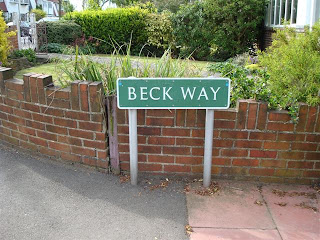
Unfortunately, I won't be going to XP 2009 - I'm sure it'll be great - enjoy it if you're going.
While training for the London to Aachen bike ride (sponsor me) I regularly cycle past a couple of signs that somehow make me think of the XP conferences:

Copyright © 2009 Ivan Moore
While training for the London to Aachen bike ride (sponsor me) I regularly cycle past a couple of signs that somehow make me think of the XP conferences:


Copyright © 2009 Ivan Moore
Sunday, April 26, 2009
Project management lessons
I signed up for the National Autistic Society's London to Aachen bike ride. When I signed up it was 3 days, with the longest day being the second at about 100 miles (it was noted that this event hadn't been run before so the itinerary might not be 100% accurate).
A few weeks later, I got an update on the itinerary - I was told that the organizer had done a recce (reconnaissance) of the route and the second day would now be 120 miles (last day longer too but not too bad).
Just over a week ago, I got another update on the itinerary; actually the second day will be 137 miles (still not shown on the web page though!). To put that in perspective - that's only 4km less than the longest stage of the Tour-de-France - ouch.
Therefore, of course, you should sponsor me. Also it gives me a good example of the sort of thing that happens with software projects very frequently; so here are some relevant lessons using this as an example.
How to handle estimation
Most people are rubbish at estimating - not only software developers about code, but lots of people about lots of other things too. The three most obvious reactions to that are (a) get better at estimating (b) take bad estimating into account (c) don't estimate (or at least, not quite like most people do). I have found "extreme planning" (see Planning Extreme Programming and Agile Estimating and Planning) to work very well - however it is only really relevant to an incremental project. Quite literally, YMMV!
For a one off event like the bike ride then there's not much I can do for this event (as consumer of the estimates). However, I will treat future event descriptions as being 40% inaccurate if they haven't been run before (i.e. using "yesterday's weather" in "extreme planning" style).
Admit when you have screwed up and don't know the answers
The first change to the itinerary was not entirely unexpected - I knew the route hadn't been done before - my expectations had been set that this was an estimate.
The second change was a nasty surprise. There are two lessons here. When giving an estimate do not give it a level of confidence that it doesn't merit. If the first change to the mileage had said "and we still aren't quite sure" then the second change would not have been so unexpected. The second lesson is that if you have screwed up an estimate, then be extra generous with the re-estimate. If the first changed estimate had been 130 or 140 then 137 wouldn't have seemed so bad. If the second re-estimate had turned out to be 125 I wouldn't have been so bothered about it dropping from 130 or 140.
Mitigating risk
If as a project manager you find out that something is going wrong (e.g. the first re-estimate of the itinerary) then do something to reduce the risk of that going even more wrong. In my case, I increased the amount of training I've been doing (hence I've been writing fewer blog articles because I'm knackered at the weekends!).
Some things you just can't predict - but maybe everything will work out OK anyway
Unfortunately, my bike has developed a fault with the gears which may make it financially non-viable to repair so I may have to get a new bike - but given the new increased mileage that may be worthwhile even if my current bike can be fixed.
I'm disappointed that the event doesn't appear as well prepared as the London to Paris bike ride that I did in 2007 and that I haven't raised as much money (yet) as in 2007, but you can help with that!
Copyright © 2009 Ivan Moore
A few weeks later, I got an update on the itinerary - I was told that the organizer had done a recce (reconnaissance) of the route and the second day would now be 120 miles (last day longer too but not too bad).
Just over a week ago, I got another update on the itinerary; actually the second day will be 137 miles (still not shown on the web page though!). To put that in perspective - that's only 4km less than the longest stage of the Tour-de-France - ouch.
Therefore, of course, you should sponsor me. Also it gives me a good example of the sort of thing that happens with software projects very frequently; so here are some relevant lessons using this as an example.
How to handle estimation
Most people are rubbish at estimating - not only software developers about code, but lots of people about lots of other things too. The three most obvious reactions to that are (a) get better at estimating (b) take bad estimating into account (c) don't estimate (or at least, not quite like most people do). I have found "extreme planning" (see Planning Extreme Programming and Agile Estimating and Planning) to work very well - however it is only really relevant to an incremental project. Quite literally, YMMV!
For a one off event like the bike ride then there's not much I can do for this event (as consumer of the estimates). However, I will treat future event descriptions as being 40% inaccurate if they haven't been run before (i.e. using "yesterday's weather" in "extreme planning" style).
Admit when you have screwed up and don't know the answers
The first change to the itinerary was not entirely unexpected - I knew the route hadn't been done before - my expectations had been set that this was an estimate.
The second change was a nasty surprise. There are two lessons here. When giving an estimate do not give it a level of confidence that it doesn't merit. If the first change to the mileage had said "and we still aren't quite sure" then the second change would not have been so unexpected. The second lesson is that if you have screwed up an estimate, then be extra generous with the re-estimate. If the first changed estimate had been 130 or 140 then 137 wouldn't have seemed so bad. If the second re-estimate had turned out to be 125 I wouldn't have been so bothered about it dropping from 130 or 140.
Mitigating risk
If as a project manager you find out that something is going wrong (e.g. the first re-estimate of the itinerary) then do something to reduce the risk of that going even more wrong. In my case, I increased the amount of training I've been doing (hence I've been writing fewer blog articles because I'm knackered at the weekends!).
Some things you just can't predict - but maybe everything will work out OK anyway
Unfortunately, my bike has developed a fault with the gears which may make it financially non-viable to repair so I may have to get a new bike - but given the new increased mileage that may be worthwhile even if my current bike can be fixed.
I'm disappointed that the event doesn't appear as well prepared as the London to Paris bike ride that I did in 2007 and that I haven't raised as much money (yet) as in 2007, but you can help with that!
Copyright © 2009 Ivan Moore
Sunday, March 8, 2009
Save Bletchley Park - the birthplace of computing!
You've heard of Alan Turing? Turing award? Turing test?
How about the Enigma machines and encryption/decryption?
What about the first computers?
What's the connection between these three?
Bletchley Park. It's a great place and historically very significant - but underfunded and in need of maintenance otherwise it'll be lost forever. Please help save Bletchley Park for future generations. Help support it by visiting - it's a great day out.
If you are an Agile coach - go to the Agile Coaches Gathering which is being held at Bletchley Park.
Copyright © 2009 Ivan Moore
How about the Enigma machines and encryption/decryption?
What about the first computers?
What's the connection between these three?
Bletchley Park. It's a great place and historically very significant - but underfunded and in need of maintenance otherwise it'll be lost forever. Please help save Bletchley Park for future generations. Help support it by visiting - it's a great day out.
If you are an Agile coach - go to the Agile Coaches Gathering which is being held at Bletchley Park.
Copyright © 2009 Ivan Moore
Friday, March 6, 2009
Bootable USB sticks for conference presentations
If you have a programming workshop or tutorial to present at a conference, where people bring their own laptops and you want to give the participants programming things to do, then one of the things that always seems to take more time than you expect (during the session) is setting up environments etc before being able to actually do any programming.
With Stuart Ervine, a colleague of mine who is running a session on GWT at SPA2009 (book now!), we have done some experimenting and now have a setup that I think works quite well - so I wanted to share it here in case it is helpful to others presenting similar sessions.
Having presented "Programming In The Small" (PITS) with Mike Hill at "Software Craftsmanship 2009" I can report that it worked quite well in practice (not perfect though - more on the glitches later).
Providing a complete environment:
Stuart and I wanted an identical environment / setup for all of the participants, so time wouldn't be wasted getting everything working on lots of different platforms. Even if you provide one click installers, participants may be understandably reluctant to install some software just for your session. They may even have things installed which conflict with whatever you want to give them. Therefore, we thought it would be better to provide a complete environment - OS and all.
We considered two approaches, providing a virtual image (e.g. VMWare or VirtualBox) with everything installed and configured, or using a bootable USB stick. I attended Lasse Koskela and Markus Hjort's excellent session "Reading Code Without Psychic Powers" where they provided bootable CDs which included the complete environment for several different languages. It worked very well - if rather slow to initially boot up. Having had that experience as a participant, Stuart and I decided to try bootable USB sticks.
Making a bootable USB stick:
First - download the latest Ubuntu (currently 8.10) - and burn it to a CD (good instructions available on the Ubuntu site). Boot your computer off the CD and be patient while Ubuntu starts (it's slow off a CD). These instructions are provided entirely at your risk.
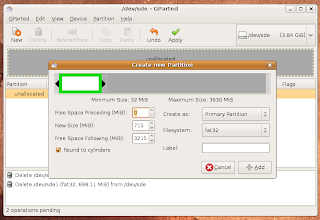
Create two partitions on the USB stick:
Write Ubuntu onto the USB stick:
You can copy whatever programs, files etc the participants need to the other partition (the second one you created). For the PITS session this meant Eclipse, Harmony JDK and an Eclipse workspace with the projects for the session. Running from the USB stick won't be very fast but may be acceptable.
To make your software run faster:
If you want the software to run faster, then set it up for participants to copy to the Ubuntu desktop (where it will be running from memory).
If you want to run memory hogging software from the desktop then participants might not have enough RAM (they might run out of memory and I think the live Ubuntu won't try to use the hard disk for swap space). You can set up Ubuntu to use swap space on the USB stick. To create and mount a 1Gb swap file:
Create an empty file the size of the swap space you want to provide (where /media/disk-1 is where the second partition created earlier is mounted) (this may take a few minutes):
dd if=/dev/zero of=/media/disk-1/swapfile.swp bs=1024 count=1024k
Provide an executable script in the second partition for participants to run if they need swap space, containing:
mkswap swapfile.swp
sudo swapon swapfile.swp
Mass production:
So far so good - however, you don't want to have to do this for every USB stick you need to create. Having created one USB stick which has everything set up just right, you can copy its entire contents (including partition table) to other USB sticks using the following (where /dev/sde is the "master" USB stick and /dev/sdf is the one you want to copy to):
dd if=/dev/sde of=/dev/sdf bs=8M count=250
This copies the first 2Gb from USB stick /dev/sde to USB stick /dev/sdf. In order to make this mass copying faster, for the PITS session we didn't use all the space of the USB sticks. We created the second partition using only part of the remaining space. The numbers for "bs" and "count" were arrived at experimentally to minimize the time it took to make the copies. (Multiply them together to work out the amount copied - i.e. using "bs=4M count=500" copies the same amount, but with my USB sticks was slightly slower). The copying may take a few minutes per stick.
Glitches and gotchas:
It would have been nice to allow participants to keep the USB sticks but they cost money and we're not working for some large consultancy who might want to do this for promotion.
You need one USB stick per machine (we had participants pairing).
We provided other mechanisms for participants to get the materials for the session - it was fairly straightforward for the PITS session as it was pure Java - so we provided the source (and Eclipse and IntelliJ project files) for participants who already have a Java environment. A lot of participants were very organized and had downloaded these materials from the conference web site before the session. We provided the materials in password protected zips and gave participants the password at the session.
And finally:
If you want to see this in action - go to Stuart's GWT session at SPA2009. Ubuntu rocks. GWT rocks. Stuart rocks. Mike rocks. SPA rocks.
Many thanks to Stuart Ervine for help with working this all out and writing it up. Many thanks to Mike Hill for preparing and co-presenting PITS.
Copyright © 2009 Ivan Moore
With Stuart Ervine, a colleague of mine who is running a session on GWT at SPA2009 (book now!), we have done some experimenting and now have a setup that I think works quite well - so I wanted to share it here in case it is helpful to others presenting similar sessions.
Having presented "Programming In The Small" (PITS) with Mike Hill at "Software Craftsmanship 2009" I can report that it worked quite well in practice (not perfect though - more on the glitches later).
Providing a complete environment:
Stuart and I wanted an identical environment / setup for all of the participants, so time wouldn't be wasted getting everything working on lots of different platforms. Even if you provide one click installers, participants may be understandably reluctant to install some software just for your session. They may even have things installed which conflict with whatever you want to give them. Therefore, we thought it would be better to provide a complete environment - OS and all.
We considered two approaches, providing a virtual image (e.g. VMWare or VirtualBox) with everything installed and configured, or using a bootable USB stick. I attended Lasse Koskela and Markus Hjort's excellent session "Reading Code Without Psychic Powers" where they provided bootable CDs which included the complete environment for several different languages. It worked very well - if rather slow to initially boot up. Having had that experience as a participant, Stuart and I decided to try bootable USB sticks.
Making a bootable USB stick:
First - download the latest Ubuntu (currently 8.10) - and burn it to a CD (good instructions available on the Ubuntu site). Boot your computer off the CD and be patient while Ubuntu starts (it's slow off a CD). These instructions are provided entirely at your risk.
Create two partitions on the USB stick:
- From the System menu, Administration submenu, select "Partition Editor"
- Take a note of the device(s) available.
- Insert a USB stick that you want to use for this (it will get completely overwritten, and must be at least 1Gb - we used 4Gb sticks).
- Right click on the USB stick that has been recognised and "Unmount Volume".
- In the "Partition Editor" (GParted) select menu item GParted -> Refresh Devices
- In the "Partition Editor" (GParted) select the USB stick from the menu GParted -> Devices
- if you proceed from this point with the wrong device selected then you'll trash your machine, so don't get it wrong. Clues about which device is the USB stick are the size of the device and that it wasn't on the list before you plugged it in.
- For each of the partitions on the USB stick (there will usually only be one) right click and "Delete"
- Click on the (now grey) bar which represents the partitions on the USB stick
- Click "New"
- Drag the right hand side of the bar and create a FAT32 partition large enough for the Ubuntu image (about 710Mb should be enough). See image below.
- Click on the (now grey) bar which represents the unpartitioned space on the USB stick
- Click "New"
- Create another partition - can be FAT32 or ext2 - doesn't really matter much. (I found FAT32 to be fine).
- Click "Apply"
- Close the "Partition Editor" (GParted)

Write Ubuntu onto the USB stick:
- From the System menu, Administration submenu, select "Create a USB startup disk"
- Select the device which is the USB stick (as noted above when creating the partitions). If you don't see your device in the list of "USB Disk to use", you might possibly have to unmount the newly created partitions of the USB stick, remove your USB stick and put it back in.
- Click "Make Startup Disk"
- Get a cup of tea - this'll take a few minutes
You can copy whatever programs, files etc the participants need to the other partition (the second one you created). For the PITS session this meant Eclipse, Harmony JDK and an Eclipse workspace with the projects for the session. Running from the USB stick won't be very fast but may be acceptable.
To make your software run faster:
If you want the software to run faster, then set it up for participants to copy to the Ubuntu desktop (where it will be running from memory).
If you want to run memory hogging software from the desktop then participants might not have enough RAM (they might run out of memory and I think the live Ubuntu won't try to use the hard disk for swap space). You can set up Ubuntu to use swap space on the USB stick. To create and mount a 1Gb swap file:
Create an empty file the size of the swap space you want to provide (where /media/disk-1 is where the second partition created earlier is mounted) (this may take a few minutes):
dd if=/dev/zero of=/media/disk-1/swapfile.swp bs=1024 count=1024k
Provide an executable script in the second partition for participants to run if they need swap space, containing:
mkswap swapfile.swp
sudo swapon swapfile.swp
Mass production:
So far so good - however, you don't want to have to do this for every USB stick you need to create. Having created one USB stick which has everything set up just right, you can copy its entire contents (including partition table) to other USB sticks using the following (where /dev/sde is the "master" USB stick and /dev/sdf is the one you want to copy to):
dd if=/dev/sde of=/dev/sdf bs=8M count=250
This copies the first 2Gb from USB stick /dev/sde to USB stick /dev/sdf. In order to make this mass copying faster, for the PITS session we didn't use all the space of the USB sticks. We created the second partition using only part of the remaining space. The numbers for "bs" and "count" were arrived at experimentally to minimize the time it took to make the copies. (Multiply them together to work out the amount copied - i.e. using "bs=4M count=500" copies the same amount, but with my USB sticks was slightly slower). The copying may take a few minutes per stick.
Glitches and gotchas:
- Be really careful about mount points (e.g. "/dev/sde") so as not to trash your hard disk.
- Not all machines will boot off a USB. The big glitch is that Apple Macs don't seem to like booting from a USB stick (and even some regular PCs don't). One potential solution for such participants is to provide a bootable Ubuntu live CD and use the USB stick for the programs to run in the live Ubuntu.
- Not all participants were overjoyed at using Ubuntu.
- Participants already using Ubuntu couldn't just run the software included in the second partition because the paths were set up for the "live CD" user.
- Participants need to have some easy way to go from having booted off the USB stick to running the software for the session - we provided a "run.sh" file but in the rush of people getting their machines to boot off the USB (trying to find which key to press to change the boot device) not everyone heard the instructions (which we should have given before handing out the USB sticks).
- Some participants took a while to find the right key to press to boot off a USB device - a lot of machines print the message saying which key to press for such a short time it is difficult to read it. It may be an idea to suggest that participants figure this out before the session.
It would have been nice to allow participants to keep the USB sticks but they cost money and we're not working for some large consultancy who might want to do this for promotion.
You need one USB stick per machine (we had participants pairing).
We provided other mechanisms for participants to get the materials for the session - it was fairly straightforward for the PITS session as it was pure Java - so we provided the source (and Eclipse and IntelliJ project files) for participants who already have a Java environment. A lot of participants were very organized and had downloaded these materials from the conference web site before the session. We provided the materials in password protected zips and gave participants the password at the session.
And finally:
If you want to see this in action - go to Stuart's GWT session at SPA2009. Ubuntu rocks. GWT rocks. Stuart rocks. Mike rocks. SPA rocks.
Many thanks to Stuart Ervine for help with working this all out and writing it up. Many thanks to Mike Hill for preparing and co-presenting PITS.
Copyright © 2009 Ivan Moore
Subscribe to:
Posts (Atom)